
 Español
  English


A Java Card Applet may run normally on one chip but fail on another. This usually doesn’t mean Java Card technology lacks portability. More often, the application depends on a specific combination of Java Card version, CAP file format, imported APIs, cryptographic algorithms, memory resources, GlobalPlatform configuration, or chip-specific features.
As a result, migration may fail during CAP loading, applet installation, application selection, or only when specific commands are executed.
The fastest way to diagnose the problem is to identify where the first failure occurs. A CAP file rejected during loading has a very different cause from an applet that installs successfully but fails when generating ECC keys.
Even when two chips use the same Java Card language, their runtime capabilities may still differ.
Many Cross-Chip Failures Occur Before the Java Card Applet Actually Runs
When a Java Card applet works on one chip but fails after migration, the application logic is not always the cause. In many cases, incompatibility appears before normal execution begins.
Java Card applications depend on several layers: the Java Card platform version, CAP files and imported packages, the card operating system, GlobalPlatform services, and the secure element’s hardware resources.
Therefore, two products labeled Java Card-compatible should not automatically be considered interchangeable.
The first diagnostic question should be:
At what stage does the Applet first fail?
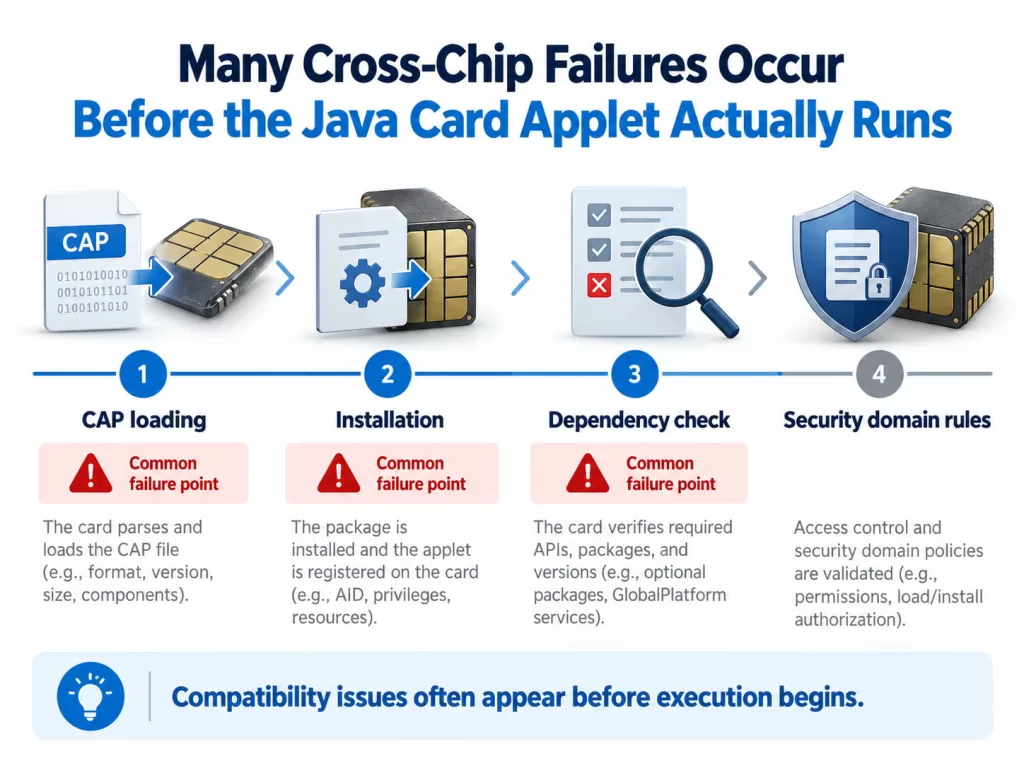
Java Card Version or CAP Dependencies May Cause Applet Loading Failure
Before loading, a Java Card application is converted into a CAP file containing dependency information such as imported packages and package versions.
Oracle’s Java Card tools allow developers to compile for a specific target platform. When one CAP file must support multiple Java Card versions, it should normally be compiled against the lowest required platform version.
This creates a common migration issue.
For example, an applet converted using the Java Card 3.0.5 API may fail when loaded onto a Java Card 2.2.2 platform because the target card does not provide the required package versions or features.
For instance, the NXP J2A080 supports Java Card 2.2.2 and GlobalPlatform 2.1.1, while the newer J3R150 uses Java Card 3.0.5 and GlobalPlatform 2.3. Both are Java smart cards, but their software environments are different.
The Same Java Card APIs Do Not Mean Every Chip Implements Every Feature
Even if a Java Card applet loads and installs successfully, compatibility problems may still appear during execution.
The application may respond normally to several APDU commands but fail when generating keys, computing signatures, allocating large buffers, or calling platform-specific functions.
Java Card technology standardizes the programming environment, but it does not make every secure element identical. Chips may differ in cryptographic accelerators, supported algorithms, memory, key lengths, performance characteristics, and proprietary extensions.
Some features defined by the Java Card API may also be optional at the implementation level. Therefore, compatibility must be evaluated at the functional level.
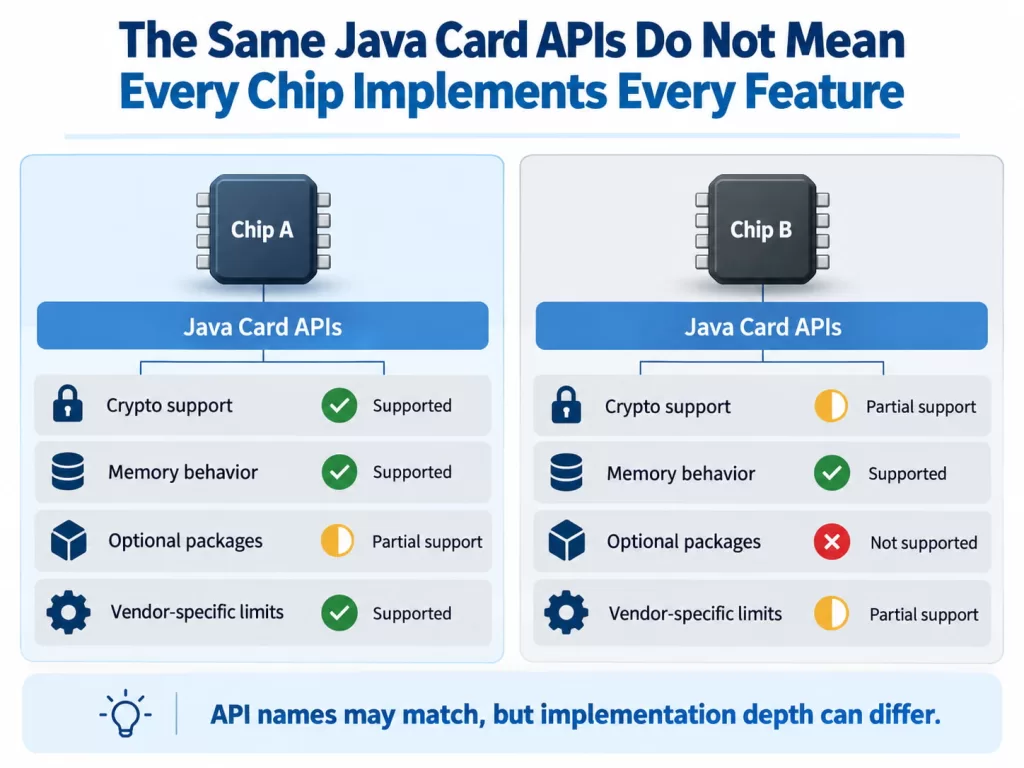
Cryptographic Support Is One of the Most Common Hidden Dependencies
Cryptographic functionality is a frequent source of cross-chip incompatibility.
A microprogram may depend on RSA, ECC, AES, SHA, key agreement, or specific elliptic curves. If Chip A supports the required function but Chip B does not, the application may appear compatible until it calls that operation.
A typical failure sequence is:
Microprogram installation successful → Application selection successful → APDU processing successful → Cryptographic operation fails
This is especially relevant for PKI, payment, authentication, digital identity, and cryptocurrency applications.
The key question is therefore not simply:
“Does this card support Java Card?”
It should be:
“Does this card support every cryptographic function the applet actually uses?”
If the original Applet also relies on proprietary libraries from a specific chip vendor, migrating it to another Java Card platform may require code modifications.
Memory Differences May Cause Runtime Failures After Installation
Memory is another important source of incompatibility.
A CAP file may fit on the target card, but installation and runtime require additional resources for persistent arrays, key objects, counters, personalization data, and transient buffers.
Therefore:
CAP file size ≠ total runtime memory requirements
For example:
Card A:
Install CAP → Create objects → Generate keys → Applet runs normally
Card B:
Install CAP → Begin installation → Memory allocation fails
The source code may be identical. The difference lies in available resources and how the target Java Card platform manages them.
For this reason, do not judge compatibility only by nominal EEPROM or Flash capacity. Testing should include the actual Applet installation, object and key creation, personalization, and execution of the final application workflow.
Cross-Chip Migration Should Be Treated as a Validation Process
Once you identify the failure stage, troubleshooting becomes much more efficient.
A common mistake is to replace Chip A with Chip B simply because both support similar Java Card versions and appear to have sufficient storage. Problems are then discovered only during installation or functional testing.
For production projects, treat cross-chip migration as a short compatibility validation process. The objective is to confirm that the new chip can reproduce the original application’s required behavior before mass production.
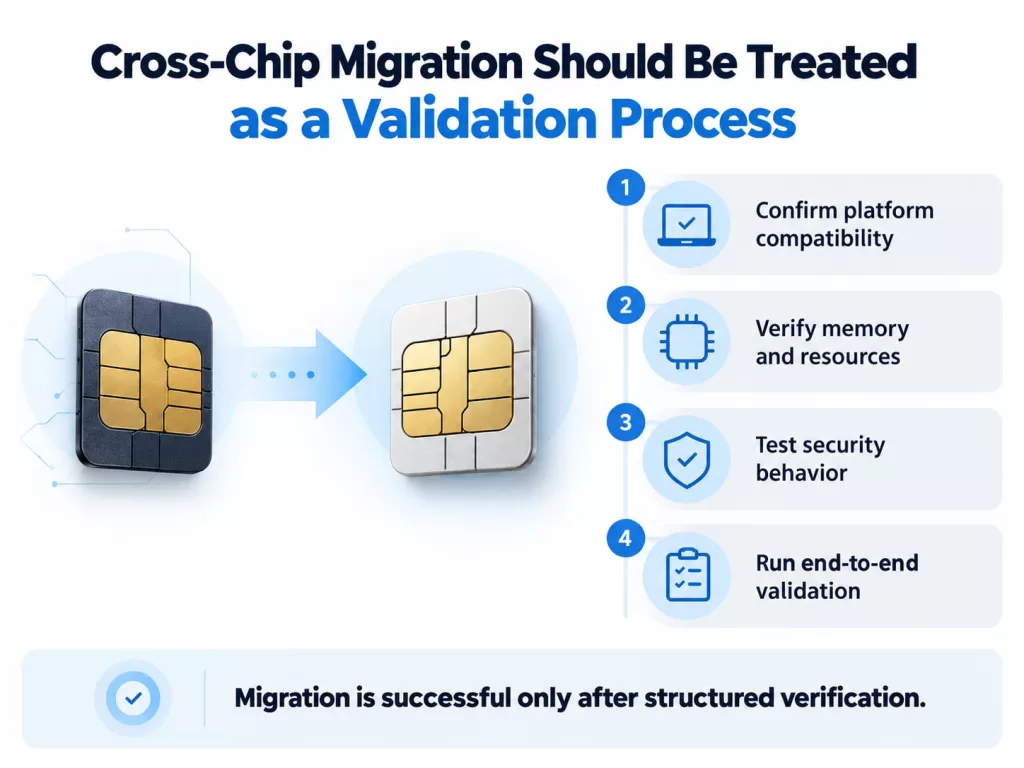
Building a Compatibility Matrix Before Testing the Target Java Smart Card
We recommend comparing the two platforms in five areas.
Step 1 — Platform Compatibility
Check the Java Card version, GlobalPlatform version, communication interfaces, and runtime environment.
Step 2 — Application Dependencies
Review the CAP version, imported packages, external libraries, Applet AID, and installation parameters.
Step 3 — Cryptographic Requirements
List the algorithms, key types, key lengths, curves, and security functions actually used by the Applet.
Step 4 — Resource Requirements
Verify available persistent memory, transient memory, and runtime capacity after installation and personalization.
Step 5 — Functional Validation
Run the same APDU sequences, personalization procedures, cryptographic operations, and error-condition tests used on the original chip.
This process helps engineers determine whether the problem comes from the platform, application package, security environment, or runtime resources while avoiding unnecessary code changes.
The Real Reason Why the Same Java Card Applet Runs Successfully on Some Chips but Fails on Others
A Java Card applet usually fails after migration because one of its original assumptions no longer matches the target platform.
The mismatch may involve:
- Java Card versions or imported packages during loading
- GlobalPlatform configuration during deployment
- Memory resources during installation
- Unsupported cryptographic functions during execution
The core diagnostic process is:
Identify the first failure stage → Compare the relevant platform dependencies → Test the Applet on the actual target card
Java Card technology provides strong application portability, but portability does not mean that all Java smart cards have identical APIs, cryptographic implementations, memory behavior, or card management environments.
Consider cross-chip migration successful only when the CAP file completes loading, installation, personalization, Select, and the full sequence of application and cryptographic operations on the intended production chip.