
 English
  Español


When comparing Java Card memory requirements during procurement, the maximum memory values listed in the datasheet may not be the most useful metric. Chip specifications may list different memory resources, such as EEPROM, Flash, RAM, and user memory; however, because these terms refer to different resources, you often can’t compare them directly across products. For Java Card buyers, the most critical issue is determining how much memory is available for installing applets, how much is available for storing application data, and whether there is sufficient runtime memory during program execution.
In projects involving payments, government IDs, public key infrastructure (PKI), and multi-application scenarios, you need to make these distinctions carefully, as these applications often require additional certificates, encryption keys, and personalized data.
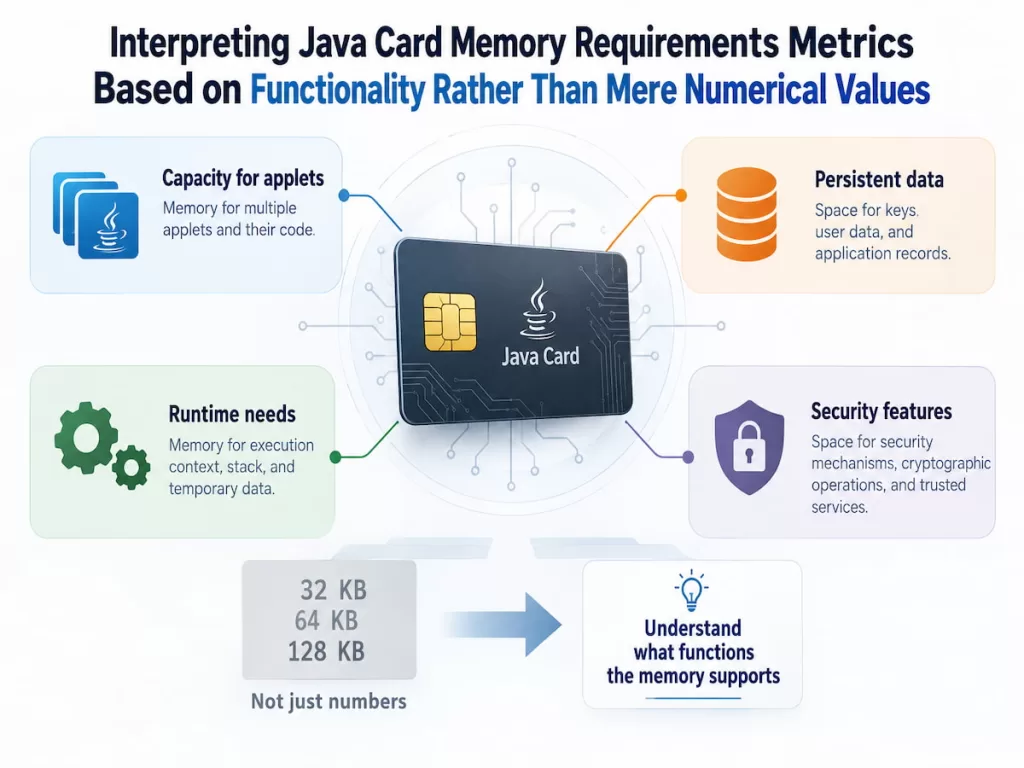
Interpreting Java Card Memory Requirements Metrics Based on Functionality Rather Than Mere Numerical Values
The Java Card data sheet may list multiple memory metrics side by side, but each metric means something different. Some metrics show how much information the chip retains after power loss, while others indicate how many resources an application can access during runtime. Understanding these differences is the first step in determining whether a card can support the expected workload.
This is because a card does more than store applets (code). It also needs to store certificates, encryption keys, personalization records, and application data, while providing enough runtime memory to process instructions securely. Even if a chip has ample total storage capacity, it may still be unsuitable if its runtime resources cannot support the application’s various operations.
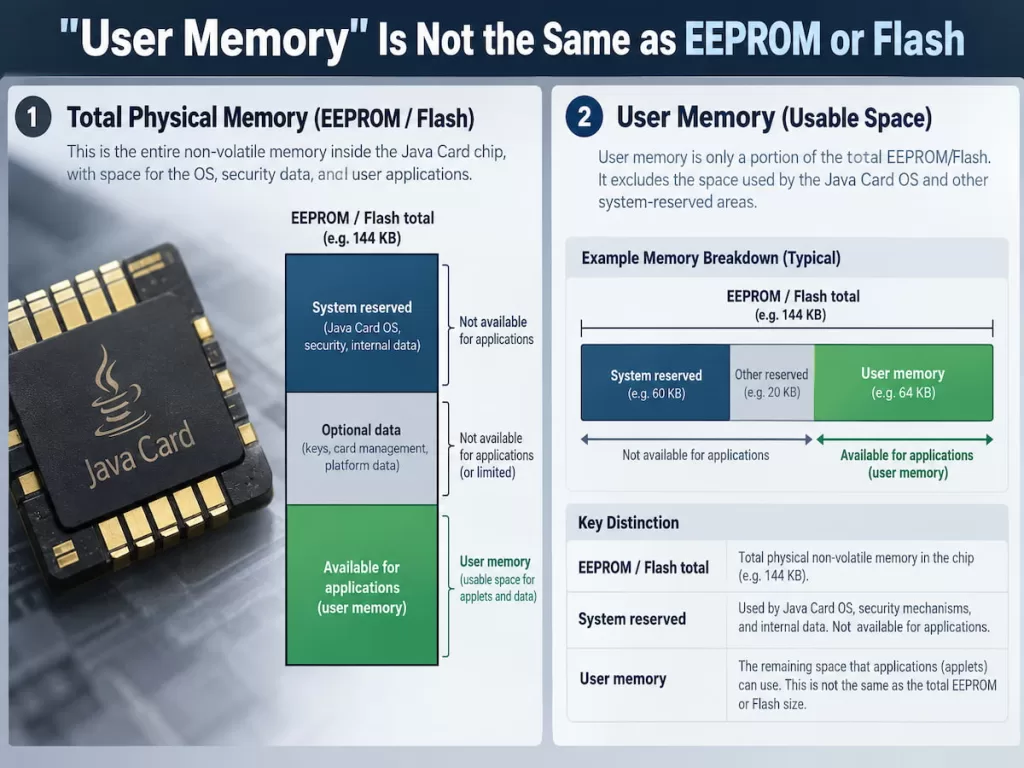
“User Memory” Is Not the Same as EEPROM or Flash
EEPROM and Flash are non-volatile storage technologies, whereas “user memory” typically refers to the storage capacity the manufacturer defines as available for applications. Its specific definition depends on the chip and its operating system.
Java Card utilizes non-volatile memory to retain information after power is lost. Depending on the platform, this information may include applet packages, installed application data, encryption keys, certificates, and personalization records. However, not every byte of the chip’s total non-volatile storage space is available for customer applications; some of this capacity may be occupied by the operating system, runtime services, or other platform requirements.
For example, the NXP J3R180 chip has 180 KB of EEPROM and 10 KB of RAM; meanwhile, product information for the J3R452 indicates that this chip has approximately 450 KB of Flash space for storing applets and the operating system. When evaluating these chips, don’t treat these values as application storage metrics on the same scale for direct comparison.
RAM and Transient Memory Determine a Smart Card’s Runtime Processing Capability
Persistent storage is only part of the picture. Java Card also requires working memory to process instructions, manage temporary data, and perform cryptographic operations.
RAM is a physical memory resource. Transient memory refers to data whose contents are cleared when a specific event occurs. In a typical smart card implementation, transient objects use RAM rather than persistent storage. The Oracle Java Card specification distinguishes between persistent and transient objects and defines different categories of transient memory for reset and deselect events. Reference: Oracle Java Card Documentation
For example, an applet may have sufficient EEPROM to store certificate and private key objects. However, it may still encounter runtime resource constraints when performing cryptographic operations that require temporary buffers.
When evaluating these resources, it is important to distinguish between the following two requirements:
- Persistent capacity: Can the smart card store all necessary applets, keys, certificates, and application data?
- Working capacity: Can the smart card allocate the temporary objects and buffers required to perform the intended operations?
Both metrics are important, but they address different issues. For a reliable memory assessment, consider them separately.
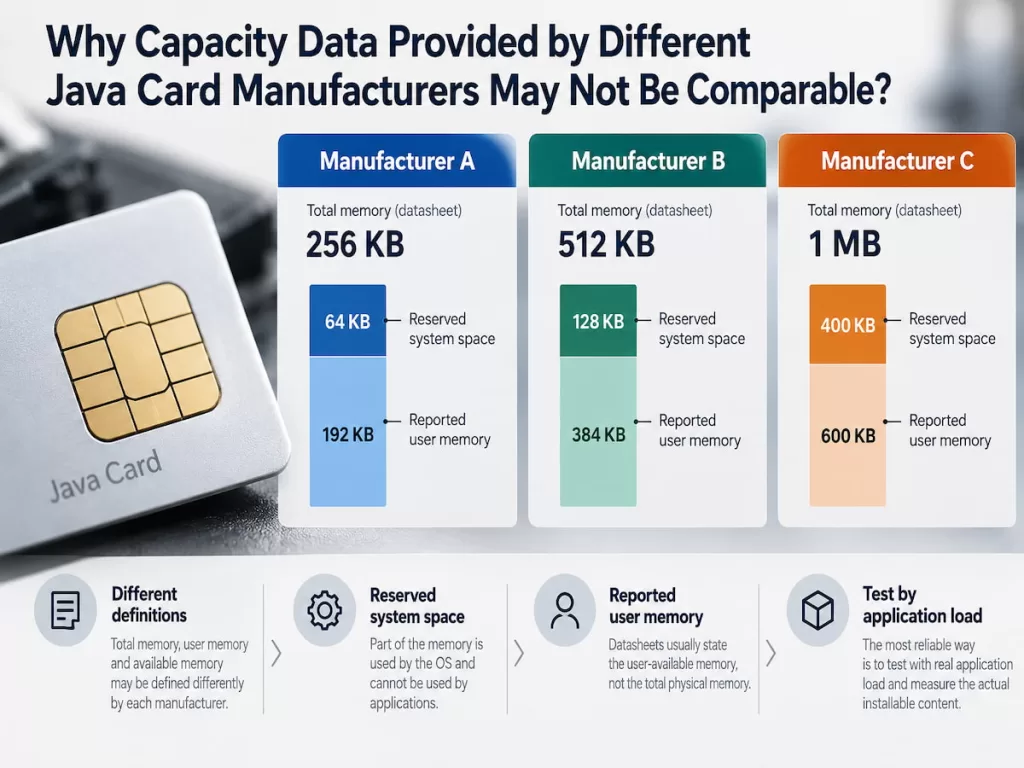
Why Capacity Data Provided by Different Java Card Manufacturers May Not Be Comparable?
Even when the specific memory type is clearly identified, comparing the data sheets for the memory requirements of two Java Card models is no easy task. Different manufacturers may use different terminology, calculate capacity at different levels (i.e., the platform level being referenced), and even group storage types with multiple uses into a single category. Therefore, a higher nominal value in a data sheet does not necessarily mean the chip provides more usable space for a specific application.
When comparing cards, focus on what these values actually mean and how the card performs after installation.
For example, metrics such as “Total Flash Capacity,” “Storage Space for Loading Applications,” and “Available Storage Space After Personalization” are defined differently.
Similarly, the RAM values listed in data sheets may not reflect the actual amount of transient storage available during specific operations. By distinguishing between these concepts, you can turn a simple data-sheet comparison into a more meaningful technical evaluation.
Compare Nominal Capacities Only When Definitions Are Consistent
| Datasheet Figure | What It Tells You | What You Still Need to Confirm |
|---|---|---|
| User memory | Capacity defined as available to applications | Whether it covers loading, installed objects, or both |
| EEPROM or Flash | Nonvolatile storage capacity | Whether operating-system and management requirements are included |
| RAM | Physical working-memory capacity | How much is available for application execution |
| Transient memory | Capacity for temporary objects | Available capacity for each clearing behavior and after allocation overhead |
| Commit capacity, if specified | Space available for transactional updates | Whether the application’s largest atomic update can fit |
Oracle’s Java Card API documentation explains why nominal values must be interpreted with caution. The value returned by `JCSystem.getAvailableMemory()` is only an upper limit, as implementation overhead and memory fragmentation can reduce the amount of memory that can be allocated. Reference: Oracle JCSystem API
In practical applications, even if a Java smart card shows ample remaining memory, it may still be unable to allocate a specific object. Similarly, chips with larger total flash capacity do not necessarily provide more usable memory for a specific applet.
Consider the following three chip specifications as examples:
| Java Card | Published Memory Information | Procurement Implication |
|---|---|---|
| J3R150 | 150 KB user memory; product information also lists a typical configuration of 144 KB EEPROM and 10 KB RAM | Confirm the precise definition of user memory for the required configuration |
| J3R180 | 180 KB user memory, 180 KB EEPROM, and 10 KB RAM | Evaluate persistent storage and working-memory needs separately |
| J3R452 | Approximately 450 KB Flash described for applets and the operating system | Confirm how much space is available for customer applications and persistent data |
These examples show that when comparing Java Card memory requirements, procurement teams should focus on each metric’s definition rather than just the nominal values.
What Should You Verify Before Procuring Java Cards, Including Java Card Memory Requirements?
The data sheet specifications are a starting point for selecting storage capacity. Still, they cannot determine whether a specific application will run successfully on the target card. This depends on applet package performance, persistent objects, encryption operations, personalized data, and the complete runtime configuration.
Therefore, when purchasing a Java Card, you should compare the manufacturer’s published specifications with the application’s actual memory requirements. Don’t focus solely on the chip’s nominal memory size; request specific measurement data and verify that competing products can meet the same requirements.

Verify the Complete Application Configuration Before Ordering
The following checks can determine whether a Java card’s capacity is sufficient to meet project requirements:
1. Confirm available persistent memory
2. Confirm working memory requirements
3. Evaluate the application’s overall resource footprint
4. Assess future scalability requirements
5. Validate the production configuration
This validation is particularly critical for Java cards that support multiple applications. A given configuration may support a single authentication applet, but it may lack the resources to run multiple applications—such as authentication, PKI (Public Key Infrastructure), and digital signatures—simultaneously.
We recommend selecting a chip based on the complete application architecture and validating the configuration before mass production. For complex applications, products with higher capacity may be more suitable; however, increasing memory should be based on actual needs rather than serving as a substitute for proper memory planning.
Which Java Card Memory Requirements Really Matter?
For Java Card, the most critical memory metrics include:
Available persistent storage space
Available working memory
Remaining storage capacity after application installation and personalization
EEPROM and Flash are non-volatile storage resources; RAM supports runtime operations; and transient memory stores temporary data and has a defined data-erasure mechanism. For the definition of “user memory,” refer to the specific documentation provided by each vendor; when comparing specification data from different manufacturers, first confirm the specific scope covered by each metric—do not simply make direct comparisons.
Finally, when procuring Java Cards, ask the vendor for a detailed breakdown of the memory configuration, calculate the application’s total storage footprint, and verify the actual configuration against the target chip.